What Is MemoryCustodian?
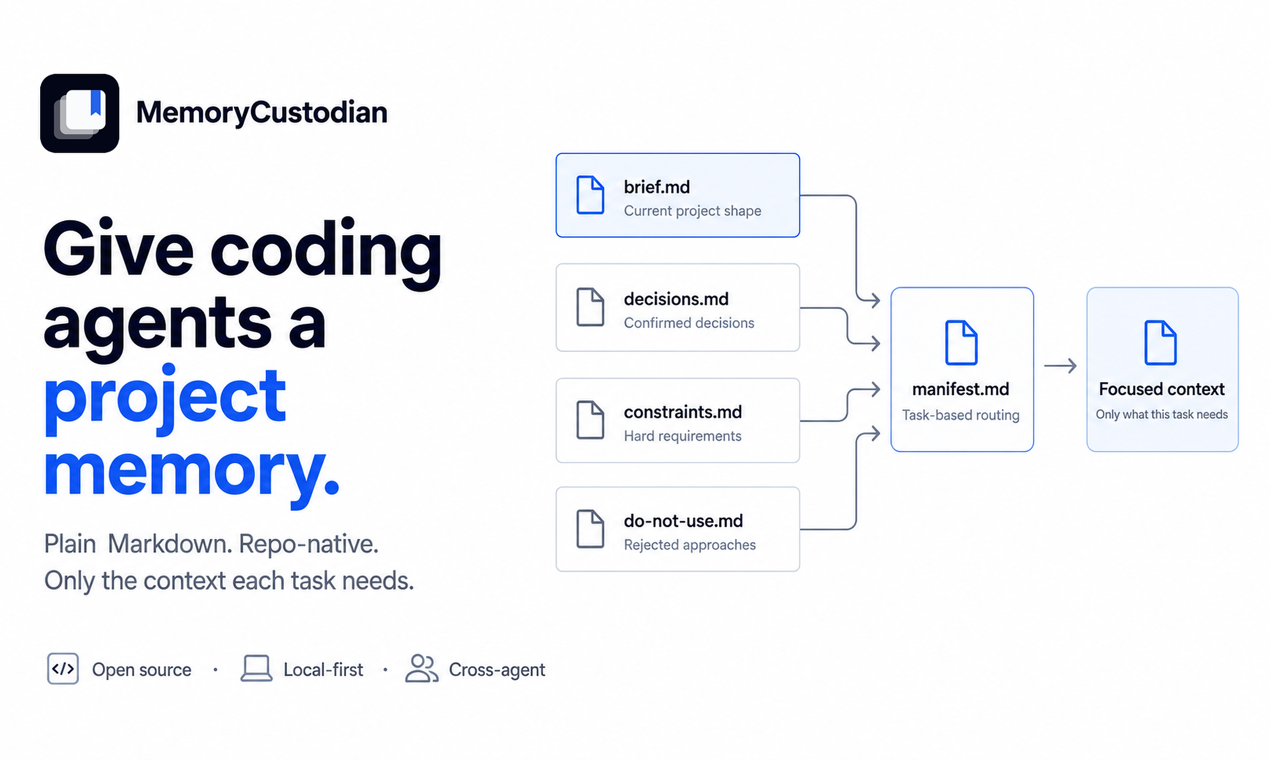
MemoryCustodian is a repo-native memory protocol and CLI for coding agents. It stores durable project decisions and constraints in plain Markdown, keeps their history in Git, and loads only the files relevant to the current task.
Coding agents are increasingly capable at writing code, tracing bugs, and navigating unfamiliar codebases. Yet every fresh session faces the same baseline limitation: the agent can inspect the current code, but has no memory of why the project was built that way. It does not know that an architectural choice was deliberate, it may suggest an approach that was already tested and rejected, and it routinely overlooks offline requirements or compatibility boundaries that leave no trace in the current AST.
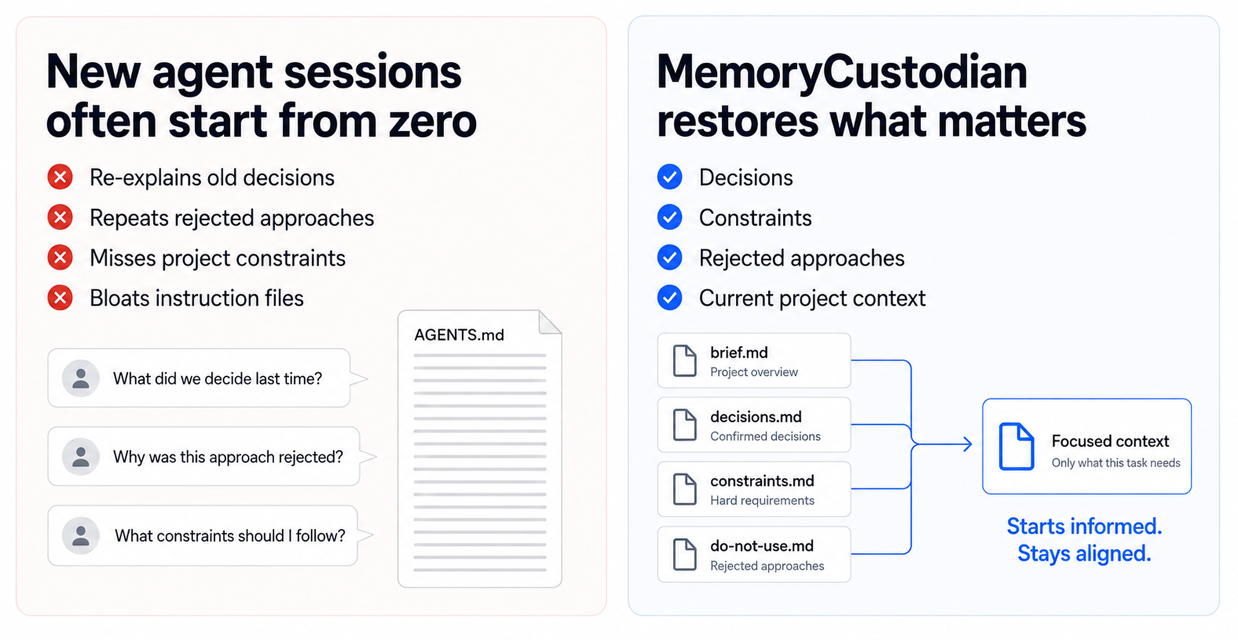
Without persistent project memory, developers are forced to repeat themselves—either pasting background into new chats or continuously appending instructions to AGENTS.md, CLAUDE.md, or GEMINI.md. Over time, those instructions turn into unmanageable lists of warnings and one-off fixes where every prompt must load the entire file, wasting token budget on irrelevant background. MemoryCustodian separates durable storage from context injection: settled decisions live in plain Markdown inside the repository, while the agent loads only the files routed to its specific task. Memory can grow, but prompt context stays small.
The Problem Is Not Missing Code
Source code describes what a system does today, but rarely explains the architectural reasoning behind it: why one pattern was chosen over another, which constraints must remain true, and which alternatives were already tested and rejected. That context typically lives in ephemeral chat threads, pull request comments, or the developer’s head.
Because new agent sessions do not inherit that unwritten context, developers find themselves repeating past explanations. For example, when an agent suggests introducing SQLite into a repository where persistent files must remain plain text, the developer explains the constraint in chat. Days later, a fresh agent session proposes SQLite again. The failure is not the model’s reasoning capability; it is that the architectural rationale was never committed somewhere subsequent sessions could discover it.
See It in Action
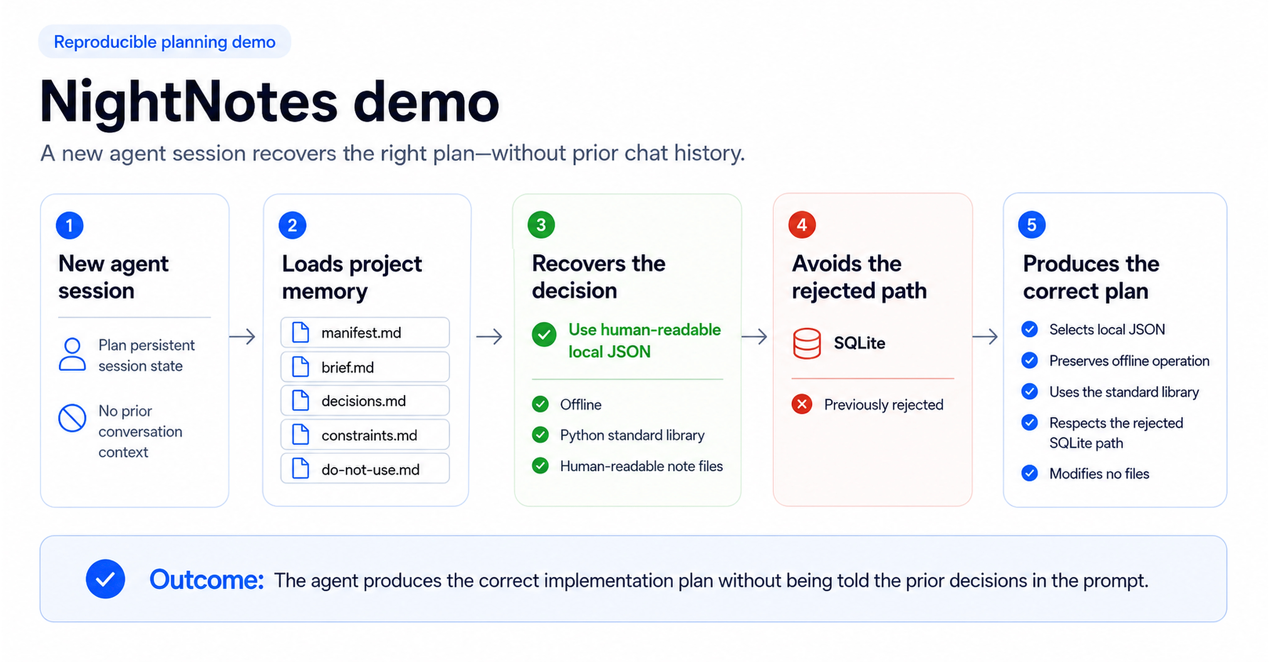
The MemoryCustodian repository includes an intentionally incomplete example project called NightNotes.
NightNotes is a small command-line application for storing session notes. Its initial implementation keeps notes only in memory, while an acceptance test documents the missing persistence behavior.
The repository already contains several durable project decisions:
- Persistent state should use human-readable local JSON
- Routine operation must work without network access
- The application should use only the Python standard library
- Existing note files must remain human-readable
- SQLite should not be introduced for the current session store
Now imagine starting a completely new coding-agent session with this prompt:
Plan how to implement persistent session state.

Before proposing changes, use the repository's project memory. Explain which
existing decisions, constraints, and rejected approaches influenced your plan.

Do not modify any files.
The prompt does not mention JSON, SQLite, offline operation, or dependency restrictions. The agent recovers those facts directly from the repository’s project memory—allowing a new session to recover the project’s durable reasoning without loading an entire conversation history.
Validate the NightNotes memory and read the planning context:
memory-custodian check \
  --project-root examples/nightnotes-video-demo

memory-custodian read \
  --project-root examples/nightnotes-video-demo \
  --task planning

The resulting context recovers the JSON persistence decision, the offline-operation constraint, the standard-library restriction, and the rejected SQLite approach. A separate encryption idea remains in the inbox because it has not yet been promoted into trusted project memory.
The example is deliberately incomplete. Its failing acceptance test defines the task that the coding agent must plan and implement. MemoryCustodian supplies the reasoning the new session would otherwise be missing.
How MemoryCustodian Works
MemoryCustodian stores project knowledge under docs/memory/. A typical project begins with a small set of Markdown files:
docs/memory/
  manifest.md
  brief.md
  decisions.md
  constraints.md
  do-not-use.md
  inbox.md
Each file has a clear purpose.
brief.mddescribes the current project directiondecisions.mdrecords confirmed choices and their reasoningconstraints.mdstores requirements that must remain truedo-not-use.mdpreserves rejected approachesinbox.mdholds candidates that still require reviewmanifest.mddetermines which memory files apply to each type of task
The key is the manifest. A planning task may need the project brief, architectural decisions, constraints, and rejected approaches. A documentation task may need the project brief and writing preferences, but not infrastructure history. A subsystem-specific task may require one area file without loading the memory of the entire repository.
MemoryCustodian turns memory loading into an explicit routing decision based on what the agent actually needs for the current task. As the repository accumulates knowledge, the active context remains small and task-specific. How routing, entry boundaries, and the agent/CLI split work in detail is covered in the technical design article.
Before and After MemoryCustodian
| Dimension | Without project memory | With MemoryCustodian |
|---|---|---|
| Historical context | Reconstructed manually in prompt paste | Recovered deterministically from repository |
| Rejected approaches | Resurface across different sessions | Preserved via tombstones in do-not-use.md |
| Instruction files | Monolithic and continuously growing | Minimal bootstrap files with task-specific routing |
| Context payload | Every task loads all stored memory | Manifest selectively loads task-relevant modules |
| Multi-agent parity | Fragmented across provider chats | Unified around repo-native Markdown authority |
Context Scoping in Practice (NightNotes Fixture)
Here is how selective loading isolates concerns in the NightNotes planning scenario:
| Loading Strategy | Scope of Stored Context | Files Injected into Prompt | Active Governance Boundary |
|---|---|---|---|
Monolithic bootstrap (AGENTS.md) |
All project instructions, decisions, & setup steps | 1 monolithic instruction file | No task filtering; historical and current directives conflated |
Naive directory dump (docs/memory/*) |
Entire memory directory | All markdown files indiscriminately | Leaks unreviewed candidates (inbox.md) and unrelated subsystems |
MemoryCustodian (--task planning) |
Curated architectural memory | brief.md, decisions.md, constraints.md, do-not-use.md |
Injects only planning invariants; excludes inbox and unrelated area context |
Leaving unreviewed notes in inbox.md and keeping unrelated subsystem files out of the prompt avoids diluting the model’s attention. The agent receives the specific architectural boundaries that matter for planning, without dragging along unverified candidates or the full historical record of the repository.
The memory belongs to the repository—not to a single chat window or proprietary memory store. Changes stay visible, diffable, and reviewable in Git, like ordinary project artifacts.
Store Decisions, Not Conversations
MemoryCustodian is not designed to archive everything an agent has ever seen.
Most conversation content should not become permanent project memory. Temporary thoughts, unfinished ideas, speculative suggestions, and one-off debugging observations can quickly turn a memory system into another unstructured context dump.
MemoryCustodian focuses on a smaller set of durable knowledge:
- Current project direction
- Confirmed architectural and product decisions
- Constraints that must remain true
- Rejected approaches that should not quietly return
- Subsystem-specific knowledge
- Repeated corrections and stable preferences Rather than attempting to maximize stored context, MemoryCustodian focuses on providing useful continuity with minimal context overhead. Agents or human developers evaluate what an assertion means—whether it is a decision, a constraint, a candidate idea, or a rejected approach—while the deterministic CLI validates schema integrity, resolves routes, and safely updates disk state. How that boundary works, and how deletions remain reviewable, are explored in the technical design and safe forgetting articles.
A 60-Second Start
The simplest way to begin is to let your coding agent install and initialize MemoryCustodian for you:
Install the MemoryCustodian skill from
https://github.com/waittim/MemoryCustodian,
then initialize it for this project.
You can also install it directly for your platform:
- Codex local marketplace
- Claude Code plugin
- Gemini Agent Skill
- Source checkout / CLI
However you install it, the entry point after installation is the same:
memory-custodian init \
  --project-root /path/to/project \
  --agent all
The initializer creates a scaffold rather than pretending to understand the repository automatically. After init, review and curate:
- Replace scaffold text in
brief.mdwith the project’s current purpose and shape - Record settled decisions in
decisions.mdwith reasoning and scope - Record invariants in
constraints.md - Record rejected approaches in
do-not-use.md - Leave speculative ideas in
inbox.mduntil they are confirmed
For the current per-platform installation steps, see the README. Once initialized and curated, the project itself becomes the source of durable agent context.
Who Is MemoryCustodian For?
MemoryCustodian is useful when:
- A project spans many coding-agent sessions
- You repeatedly explain the same decisions
- Rejected approaches keep returning
- Instruction files are becoming too large
- Multiple coding agents work on the same repository
- Important constraints must survive across sessions
- A team wants memory changes to be reviewable
- Local, transparent, version-controlled memory matters
It is especially useful for long-running projects where continuity matters more than remembering every detail.
MemoryCustodian is not a good fit when:
- You need personal preferences that span many unrelated repositories
- The primary problem is searching a large document corpus by similarity
- Access control, multi-tenant permissions, or a hosted knowledge base are the main requirements
- You want an automatic archive of every conversation transcript
- The project has no durable decisions worth governing yet
It is a governance layer for the small set of project knowledge that should reliably shape future agent behavior—not a replacement for source documentation, general-purpose search, or conversation history.
Make the Next Session Better
Coding agents do not need an unlimited transcript of everything that happened before.
They need trustworthy answers to a smaller set of questions:
- What is this project trying to do?
- What decisions are already settled?
- What constraints must not be broken?
- What approaches should not be proposed again?
- What context is relevant to this task?
- Which new observations deserve to persist?
MemoryCustodian keeps those answers inside the repository, where developers, teammates, and agents can inspect them.
Its design is intentionally restrained:
- Store durable memory as plain Markdown
- Keep platform instruction files thin
- Route context through a manifest
- Load only what each task needs
- Let agents decide meaning
- Let deterministic tooling enforce structure
- Keep memory changes deliberate and reviewable
- Keep routine operation local and portable
MemoryCustodian is not a complex black box, but a disciplined workflow for helping coding agents carry a codebase forward: record settled decisions once, govern them through Git, and let every future session inherit the exact context it needs.
Key Takeaways
- Project memory should preserve decisions and constraints, not entire conversations.
- Durable memory and active context are separate concerns.
- Markdown and Git keep agent memory portable, inspectable, and reviewable.
- Manifest-based routing keeps the context for each task intentionally small.
Frequently Asked Questions
Does MemoryCustodian work across coding agents?
Yes. Its durable memory is plain Markdown stored in the repository, so the same project knowledge can be used by Codex, Claude Code, Gemini CLI, and other agents that can read repository files.
Why not put everything in one instruction file?
A single growing file makes every task pay the context cost of every stored decision. MemoryCustodian keeps platform instructions thin and routes task-specific memory through a manifest.
Does MemoryCustodian require a hosted database or embeddings?
No. Routine operation is local and repo-native. The design favors transparent files and deterministic structure over a proprietary storage or retrieval layer.
- Install MemoryCustodian
- Read the technical design
- Read the memory governance design
- Read Part 4: What Should a Coding Agent Be Allowed to Remember?
- Read Part 5: A Memory System Should Explain What It Did Not Load
- Read Part 6: A Memory System Should Survive an Interrupted Write
-
Older Post
Social inequality and cultural factors impact the awareness and reaction during the cryptic transmission period of the pandemic -
Newer Post
Slides Thief - Turn Photographed Presentation Slides into Clean PDFs