The paper has been published in Electronic Imaging (2023): WearMask: Fast in-browser face mask detection with serverless edge computing for COVID-19. A preprint is also available on arXiv. Source code: browser deployment · training pipeline.
Background
Last November, the COVID-19 epidemic in the United States reached a new peak. During Thanksgiving week alone, there were 1,147,489 new cases and 10,279 new deaths.[1] These are not just numbers. They mean that 10 thousand families lost their loved ones, and 10 thousand people would never have another Thanksgiving.
Even after Thanksgiving, the daily increase in cases hit new highs many times. Before the vaccine arrived, we had no way to prevent infection except for wearing masks and maintaining social distance. Even after the successful development of a vaccine, due to factors such as vaccination rates, we still need to recognize that preventing infection will remain part of our lives for a long time.
The transmission of infectious diseases depends on three elements: the source of infection, the route of transmission, and the susceptible population. Wearing a mask is the most convenient way to cut off the route of transmission. According to the data, if both parties wear masks, even if a social distance of 6 feet is not maintained, the risk of transmission will be reduced from 90% to 1.5%. Therefore, it is necessary to ensure that as many people as possible wear masks in public places.
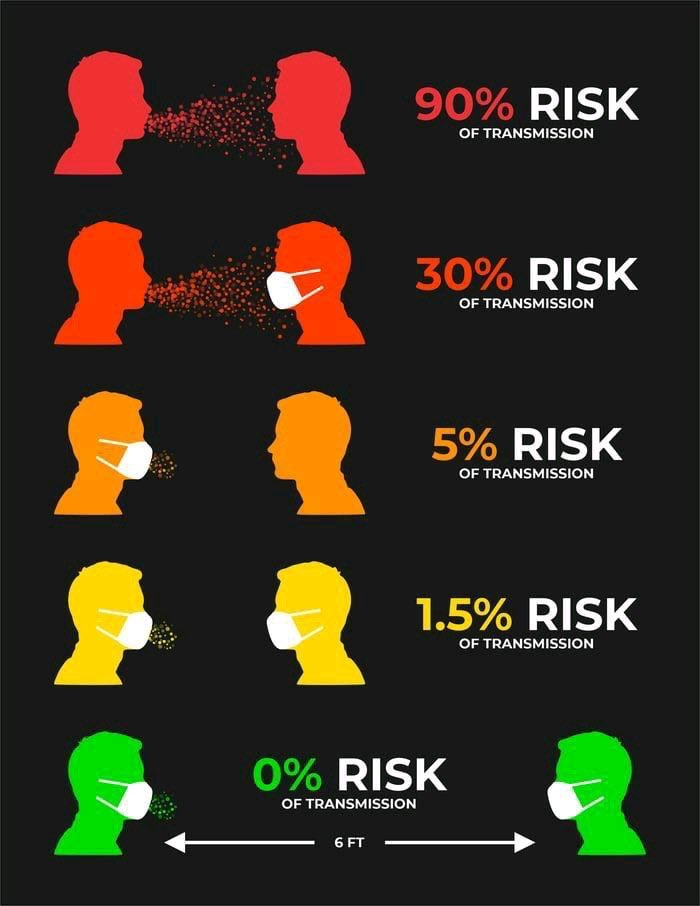
The question is, how to do it?
At the entrances of luxury stores and large supermarkets, we can often see staff specifically reminding people to wear masks or setting up mask detection machines. However, it is difficult to find them in small businesses or public facilities. The reason is obvious: hiring someone to remind customers is expensive. In 2019, the average monthly income in the U.S. was approximately $4,365. Setting up professional mask detection equipment can cost $1,000-$4,000. After the pandemic is over, these devices may be useless. Therefore, this is an unaffordable cost for small businesses that are struggling to survive.

Considering that the United States has 30.2 million small businesses[2] and a large number of public facilities, it is necessary to find an affordable alternative. This is also the main purpose of this project: to develop a low-cost face mask detection program.
Modeling
Considering that the target is a low-cost and wide-coverage mask detection solution, the first factor is the choice of model.
Due to the cost limitation, the final product cannot have high requirements for device computing power. Generally, the smaller the model, the less computing power it needs, and the faster it runs on edge devices. So I only considered using a small object detection model.
Existing miniaturized face detection models can reach a size of about 2M, and models such as Retinaface[3] can achieve strong recognition results for human faces. However, considering that the goal of the project includes detecting faces wearing masks, this imposes greater restrictions on the use of facial landmarks. Therefore, I did not choose to use a single-category face detection model.
Among the multi-category detection models, the final model I used is Yolo-Fastest[4].
YOLO is short for You Only Look Once. It divides the image into different grids, and each grid is responsible for the boxes with the center point in that grid, which reduces a lot of repetitive work compared to R-CNN-type models. Therefore, the YOLO model family is known for its speed. Yolo-Fastest is an open-source small object detection model shared by dog-qiuqiu. It may be the fastest and lightest known open-source YOLO general object detection model. Its size is only 1.3M, making it very suitable for deployment in low-computing-power scenarios such as edge devices.
| Model | Yolo-Fastest | YOLOv3-tiny | YOLOv3-SPP | YOLOv5s | YOLOv5m | YOLOv5l | YOLOv5x |
|---|---|---|---|---|---|---|---|
| Weight size | 1.3M | 8.9M | 63.0M | 7.5M | 21.8M | 47.8M | 89.0M |
In the model training part, the dataset I used mainly comes from the MAFA dataset and the WIDER FACE dataset. The MAFA (MAsked FAces) dataset is collected from internet images and contains various face images with masks and annotation information.[5] The WIDER FACE dataset is collected from the WIDER dataset, most of which consists of faces without masks.[6] In the original MAFA dataset, the upper edge of the marking box is only marked up to the eyebrows of the face, while the WIDER FACE dataset marks the position of the whole face. Thanks to AIZOO[7] for re-annotating the data in the MAFA section. The final dataset I used contains 4065 MAFA pictures, 3894 WIDER FACE pictures, and a small number of pictures with faces covered by hands.
However, if these data are used directly for training, the model will be difficult to converge. Therefore, the model used has been pre-trained using the COCO dataset (Microsoft Common Objects in Context, 80 categories)[8]. Then, after changing the output categories and related model structure, I used this dataset for training.
The code framework used for training is mainly adapted from the YOLOV3 repository from Ultralytics[9]. Training was completed on Google Colab, and the results are as follows:
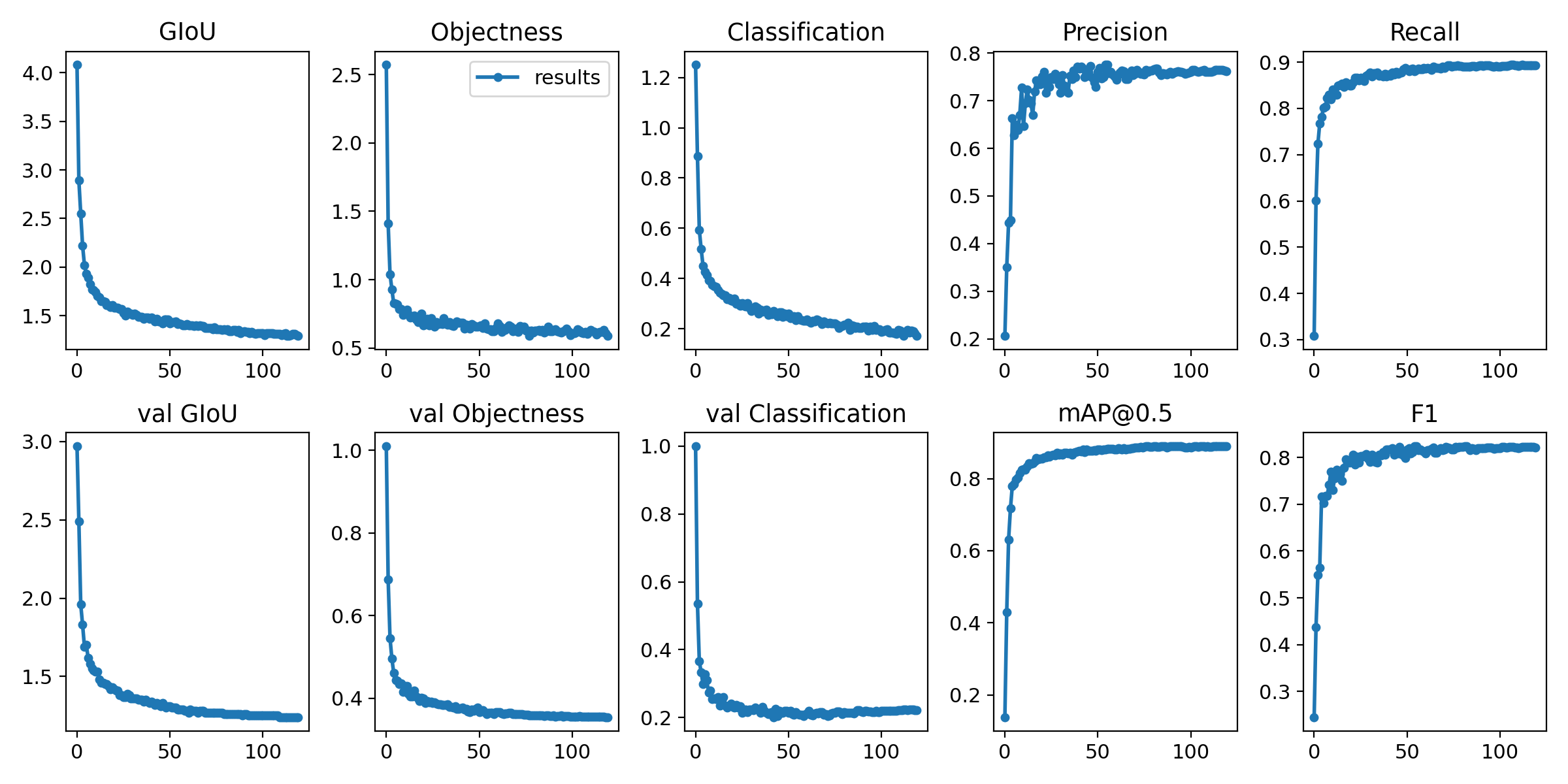
It can be seen that the model has achieved good training results, and mAP@0.5 is stable above 0.8.
Deployment
In order for the target users to achieve mask detection at the lowest cost, the form of the final product needs to be considered.
If I choose to develop special equipment, users still need to purchase additional equipment. This form is not significantly different from the existing mask detection equipment on the market. The device can only be used for mask detection, which will lose its value after the pandemic is over. Even if the cost can be reduced as much as possible to lower the price, it would still greatly restrict adoption. In addition, a large number of issues such as equipment manufacturing and sales need to be considered, which is far beyond my ability. Therefore, this scheme is not feasible.
If I choose to develop an app to achieve this function, considering the diversity of user equipment, I need to develop apps for various systems separately, including at least Android, iOS, Windows, and macOS. Due to the fragmentation of the Android ecosystem, it is also necessary to adapt to various common types of Android devices. This would be a lot of work, so I gave up the plan.
Therefore, the solution I chose was to develop a web page so that mask detection can be achieved in the browser. The reasons are as follows:
- As one of the most commonly used types of software, the browser can be found on most devices and adapts well to the corresponding system.
- Only one web page needs to be created, and it can be used on most devices.
- Users only need to open the web page to use it, with almost no learning cost.
Even for web page deployment, it is necessary to determine how the model runs: whether the model runs on the server side or locally in the browser. If the model is placed on the server side, the server will require huge bandwidth and must handle a large amount of video data, which is difficult for me to afford. Moreover, deploying the model on the server means that videos containing faces need to be uploaded to the server, so many users will have privacy concerns. Uploading and downloading videos also require a stable internet connection and may create large data costs for users, which brings additional costs and restrictions. Therefore, enabling the model to run locally in the browser became the final choice.
Common ways to make the model run in the browser include using TensorFlow.js[10] or ONNX.js[11]. I tried both approaches.
ONNX.js
In order to use ONNX.js, I first need to convert the existing PyTorch model into an ONNX model. ONNX is the abbreviation of Open Neural Network Exchange.[12] As an open format, ONNX defines various common operators in the field of machine learning and deep learning to help developers use ONNX as a relay for converting models from one framework to another. ONNX supports PyTorch, TensorFlow, Caffe2, NCNN, and other common deep learning frameworks. ONNX.js is a JavaScript (abbreviated as JS) library that can directly read the ONNX model in the JS environment for inference.
The first problem is that JS does not support INT64 format variables, and ONNX.js runs in the JS environment. The ONNX model directly exported by PyTorch contains a large number of variables in the INT64 format. Therefore, I need to convert the INT64 components to INT32 format in the ONNX model. After learning the specific structure of the ONNX model, I completed this part of the conversion through filtering, extraction, and replacement. It should be noted that some ONNX operators do not support INT32 as input, such as ConstantOfShape, so people need to find an alternative method by themselves.
Secondly, in the attempt, I found that because ONNX.js is relatively niche, there are many operators that are not supported, including Resize in the model I used. After contacting the ONNX.js maintenance team, this point was also confirmed.[13] To solve this problem, I need to understand the library in depth, modify the ONNX.js library, and add support for the operator. Since I have no experience in JS, I finally gave up on this solution.
TensorFlow.js
In order to use TensorFlow.js, I first need to convert the model to TensorFlow SavedModel format or Keras h5 format. The conversion from the PyTorch model to the SavedModel model is accomplished through the ONNX model mentioned above as a relay. TensorFlow.js does not run the TensorFlow model directly in the JS environment; instead, it first needs to convert the model into a special readable web-format model.[14] However, at this step, I also encountered an unsupported operator, TensorScatterUpdate. After contacting the TensorFlow.js maintenance team, they said “we should be able to add the support fairly soon”[15] at that time. Nevertheless, the operator had not been supported at the time of writing.
Since TensorScatterUpdate comes from the model conversion process, I tried to directly use the Keras framework to read the model structure and weight files in the Darknet model files. After the release of TensorFlow 2.0, Keras has been embedded as a part of the TensorFlow framework. The existing code on the Internet is based on the old version of Keras, so I refactored the conversion code according to the new Keras API, and added the processing of grouped convolution and other structures. However, even so, the converted model still cannot be converted to the form required by TensorFlow.js.
Therefore, in the end, I chose to continue to look for other solutions.
NCNN + WebAssembly
During the exploration process, I found a possibly effective way to implement in-browser operations through the NCNN framework and WebAssembly.
NCNN is an open-source optimized inference framework for mobile platforms, implemented in pure C++ and without third-party library dependencies.[16] Its performance on edge devices is excellent. WebAssembly (abbreviated as WASM) is a low-level language that can run in the browser.[17] It is in binary form and is faster than JS. C++ code can be compiled into WASM format. This also means that we can run C++ programs in the browser using this approach. As long as NCNN supports enough operators, we do not need to worry about whether a certain operator has been implemented in JS. Fortunately, NCNN is mature enough and already supports a large number of operators.
Therefore, I first converted the PyTorch model into an NCNN model. Then I wrote a C++ program that inputs the image in RGBA format in the main process, uses the NCNN library for inference, and finally outputs the category, confidence, and boxes. The C++ program is compiled into WASM format. After that, in the JS program, the WASM program is called as a function. The camera video stream is obtained and passed into the function, and finally the output result is used to draw the image.
After completing the core program, I used HTML and CSS to complete the development of the web page around the program. I made different adaptations based on the degree of WebAssembly support under different systems to obtain the highest FPS.
Conclusion
In general, the project has achieved its original purpose: providing a low-cost alternative to mask detection equipment. The live demo is at facemask-detection.com. The open-source code is split across facemask-detection (browser deployment) and mask-detector (training pipeline).
The advantages are summarized as follows:
- Easy to use. Users do not need to purchase any professional equipment or download any software. Just open the web page, and you can use it.
- Low cost. Users can use their idle tablets, iPads, or laptops. Even if the user wants a new one, they can buy a new tablet and its stand for less than $100 and get functions similar to a device that costs thousands of dollars.
- High speed. Because the model size is extremely small, the NCNN framework is optimized for mobile devices, and the final program runs through binary-based WebAssembly, the overall speed is extremely fast. This also means that users can get the smoothest experience.
- No privacy issues. Since the program runs entirely in the browser locally in real time, there is no need to save any content or upload any data to the server, so users do not have to worry about privacy issues.
- Multi-language support. The UI now supports English, Chinese, Spanish, French, German, Japanese, Portuguese, Korean, Italian, and Russian.
[1] https://coronavirus.1point3acres.com/
[2] https://www.fundera.com/blog/small-business-employment-and-growth-statistics
[3] https://github.com/biubug6/Pytorch_Retinaface
[4] https://github.com/dog-qiuqiu/Yolo-Fastest
[5] https://openaccess.thecvf.com/content_cvpr_2017/papers/Ge_Detecting_Masked_Faces_CVPR_2017_paper.pdf
[6] http://shuoyang1213.me/WIDERFACE/
[7] https://github.com/AIZOOTech/FaceMaskDetection/blob/master/README.md
[8] https://cocodataset.org/
[9] https://github.com/ultralytics/yolov3
[10] https://github.com/tensorflow/tfjs
[11] https://github.com/microsoft/onnxjs
[12] https://onnx.ai/
[13] https://github.com/microsoft/onnxjs/issues/240
[14] https://www.tensorflow.org/js/tutorials/conversion/import_saved_model
[15] https://github.com/tensorflow/tfjs/issues/4222
[16] https://github.com/Tencent/ncnn
[17] https://webassembly.org/
-
Older Post
Super-Fast In-Browser Face Mask Detection -
Newer Post
K-Means-Based Anomalous Email Detection in PySpark