What Changed in Slides Thief 2.0?
Slides Thief 2.0 replaces a fragile single-rectangle heuristic with an evidence-aware detection pipeline. Rather than prematurely committing to the first plausible boundary, multiple browser-local detectors concurrently propose candidate quadrilaterals. Slides Thief evaluates edge support, scores competing hypotheses, automatically refines high-confidence results, and flags ambiguous pages for manual review.
For users, the change is broader than a new detector:
- bright and dark slides can both produce valid boundary evidence
- uncertain and fallback results are easier to find and review
- photos from the same batch can share a carefully constrained geometry prior
- source format is separated from PDF layout, with support for slide and document-shaped sources
- HEIC conversion, preview failures, large images, filenames, keyboard adjustment, and export are handled more robustly
The complete workflow still runs locally: photos are decoded, analyzed, corrected, and assembled into a PDF without being uploaded to a backend.
This article explains why the detector needed a different architecture and how the new design combines automation with explicit human review. For the product overview and usage guide, see Slides Thief - Turn Photographed Presentation Slides into Clean PDFs.
For developers building browser-local screen and document correction systems. Implementation details reflect Slides Thief 2.0.0.
Why Slide Detection Is Harder Than It Looks
Once four accurate corners are known, perspective correction is mathematically straightforward: a projective transform maps the detected quadrilateral into a rectangular canvas. Finding those four corners in real-world photographs is where heuristics routinely fail. A projection screen often bleeds into a light-colored wall, camera perspective skews angles far from horizontal, and the slide content itself generates competing edges—such as tables, code blocks, or UI windows—that produce sharper contrast gradients than the actual physical frame.
Furthermore, real photos suffer from occlusions, projector glare, motion blur, and uneven lighting. Rather than asking a single detector to find the “strongest rectangle” in isolation, Slides Thief 2.0 reframes the problem: which candidate quadrilateral best explains the available edge evidence, and is that evidence strong enough to accept without human review? That architectural shift drove the entire 2.0 redesign.
The Limits of the Original Heuristic
The first Slides Thief detector was intentionally lightweight. It ran directly in a browser worker, required no machine-learning model, and avoided a large computer-vision runtime.
Its approximate flow was:
Resize and blur the photograph
        ↓
Search for four contrast lines
        ↓
Combine them into quadrilaterals
        ↓
Score by contrast, area, and aspect ratio
        ↓
Return the best result
This worked well for a common case: a bright projected slide surrounded by a darker room. Searching for four supporting lines independently also allowed the detector to recover a quadrilateral when the boundary was interrupted and no perfect closed contour existed. However, the approach embedded several fragile assumptions: it assumed a brighter interior, searched within narrow slope ranges, and allowed area and aspect ratio to dominate scoring. As a result, dark slides had inverted contrast, rotated phones pushed edges outside search bounds, and outer display bezels routinely outscored the actual slide. Most critically, the detector committed to a single answer prematurely without preserving competing hypotheses or signaling when boundaries were ambiguous. The next version needed an architecture that could preserve alternatives.
Separate Source Geometry from PDF Layout
A foundational design change in 2.0 is decoupling source geometry recognition from PDF canvas layout. A photograph may contain a 16:9 presentation slide that the user wishes to compile into an A4 landscape document. Conflating these goals forces the edge detector to search for an aspect ratio that does not exist in the physical room, or stretches corrected slides unnaturally to fill paper boundaries.
Slides Thief 2.0 cleanly separates these concerns: recognition describes the physical source geometry, while layout formatting determines how that rectified image is presented on the target page:
Photograph → Detect source boundary → Rectify source format → Center into PDF layout
Supported source formats include 16:9, 4:3, 16:10, A4, Letter, and custom aspect ratios. The selected source ratio guides boundary candidate evaluation across a batch, while the output PDF layout remains an independent parameter with automatic margin filling. This unified pipeline handles presentation slides and paper documents identically without geometric distortion.
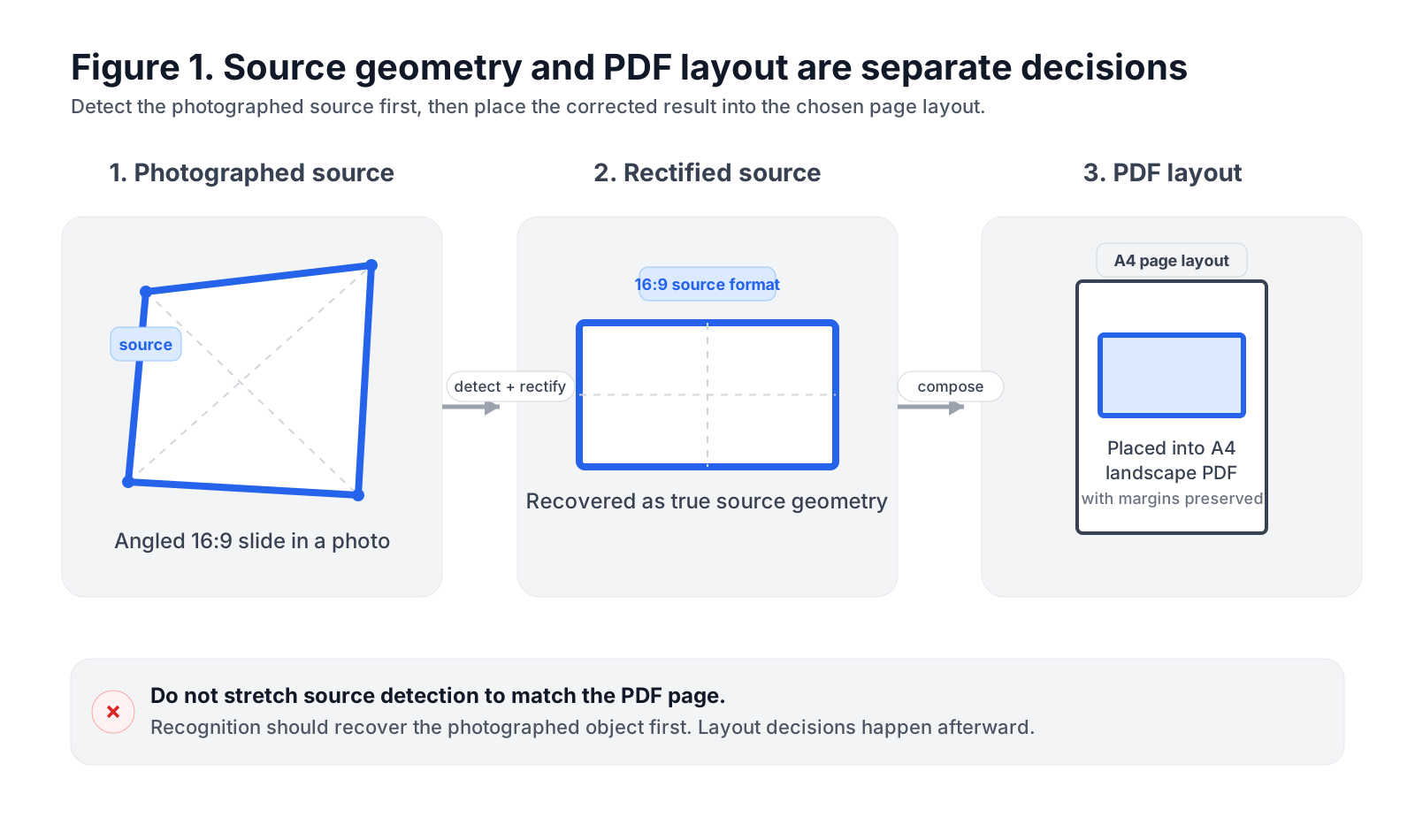
Figure 1: Slides Thief detects and rectifies the source geometry before placing the corrected result into the independently selected PDF layout.
Detectors Propose Candidates, Not Answers
The central architectural change in 2.0 is that no individual detector owns the final result.
Each detector proposes quadrilateral candidates. A shared pipeline then validates, scores, deduplicates, and compares them:
Image
  ↓
Shared image features
  ├── Contrast-line candidates
  ├── Adaptive-mask candidates
  ├── Gradient and Hough-line candidates
  └── Optional batch-prior candidates
  ↓
Geometry validation and shared scoring
  ↓
Candidate deduplication
  ↓
Local edge refinement
  ↓
Confidence and review decision
This avoids a weakness of sequential fallback systems: a merely plausible result from one method should not prevent another from proposing something better.
Slides Thief combines three complementary single-image methods.
Bidirectional contrast
The contrast detector measures differences between pixels just inside and outside a possible edge. Version 2.0 evaluates both directions, so the interior may be brighter or darker than the exterior and the preferred direction can differ by edge.
Dark slides on bright walls are therefore valid candidates rather than automatic failures.
Adaptive masks
The mask detector uses brightness and saturation statistics to search for a coherent region, fits possible boundary lines around it, and proposes several nearby quadrilaterals.
It can help when the slide forms a consistent bright or low-saturation region despite a weak physical outline. Because a bright wall or neutral object can produce similar evidence, its output remains a candidate rather than a final answer.
Multiscale gradients and line geometry
The third method combines luminance and color-opponent gradients at several scales.
Coarser scales suppress fine slide content while preserving larger structural transitions. Gradient orientation then guides a Hough-style search for long boundaries without assuming that the phone was held level.
The resulting lines are grouped into two dominant direction families. Opposing lines from those families can form rotated or perspective-distorted quadrilateral candidates.
The methods solve different parts of the problem. Reliability comes from comparing them under the same rules.
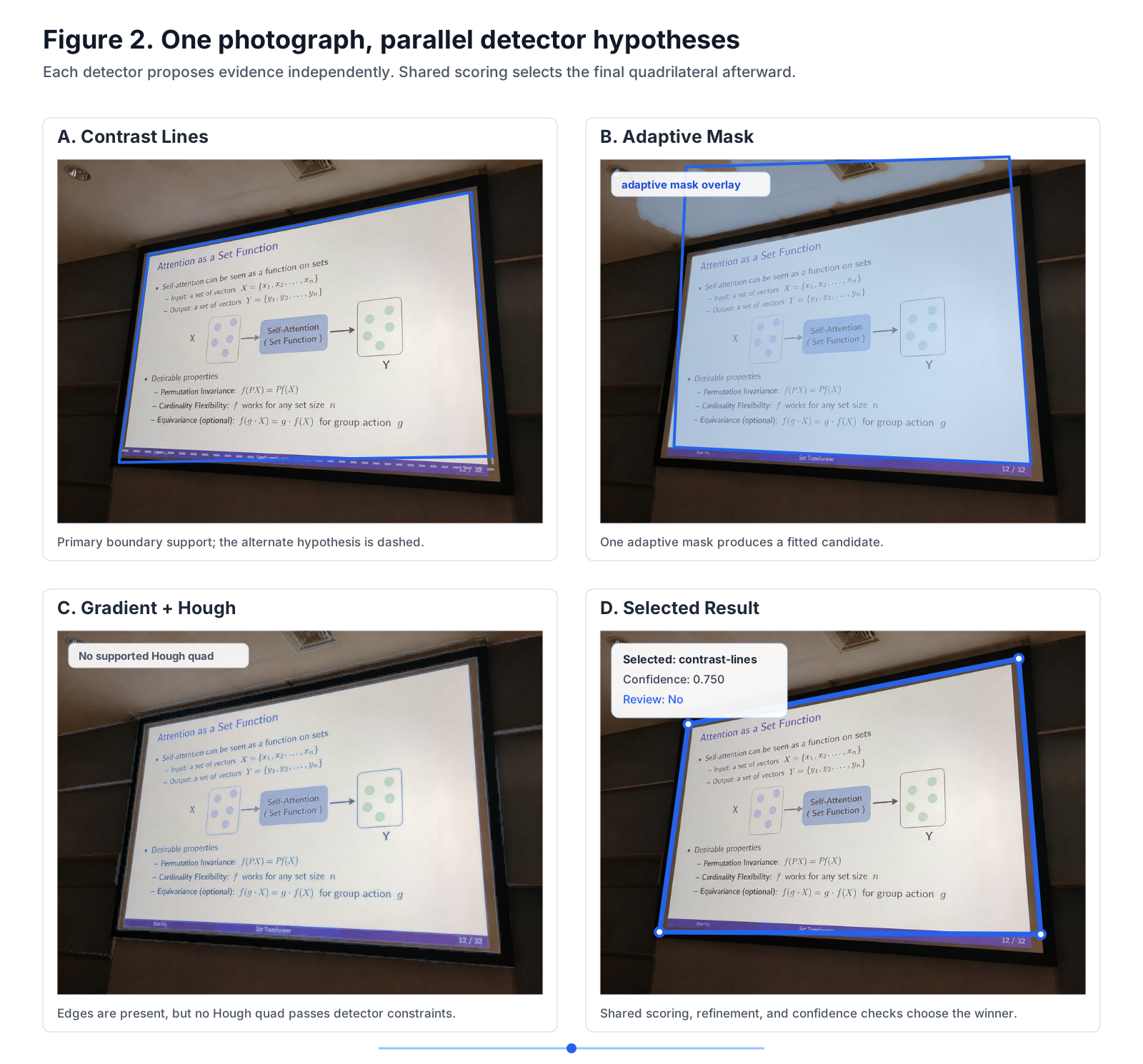
Figure 2: Different detectors can explain the same photograph differently. Slides Thief keeps these hypotheses separate until they can be compared using shared visual, geometric, and confidence evidence.
Score the Whole Boundary
A strong line can still be the wrong line.
Slides Thief therefore evaluates evidence along all four sides, including:
- edge strength and support
- continuity and unsupported gaps
- gradient alignment
- inside-outside separation
- region consistency
- geometric validity
- source-ratio and area priors
Visual evidence has the strongest influence. Area and source ratio are weak terms in the shared scorer. Separately, the contrast-line generator uses broad ratio bounds to reject extreme hypotheses before ranking.
Invalid geometry is rejected early. A candidate must describe a sufficiently large, convex, non-degenerate quadrilateral that remains within bounded image-relative limits.
Candidates from different detectors are also deduplicated. If contrast, mask, and Hough methods converge on nearly the same boundary, that should count as agreement rather than appear as three competing answers.
After ranking, the strongest candidate is refined locally. Each side can move by a limited amount to find better-supported edges, but the search is constrained so it cannot jump freely to an internal table or outer display frame.
This separates two tasks:
Global detection:
Which boundary is intended?

Local refinement:
Where exactly does that boundary lie?
Confidence Is Part of the Workflow
A high candidate score does not automatically mean that the result is unambiguous.
Another, geometrically different candidate may have almost the same score. The detector may be unable to decide between the visible slide, the physical frame, and an internal rectangle.
Slides Thief 2.0 therefore considers both the winning candidate and its alternatives. Confidence is influenced by:
- the winning score
- the margin over the next distinct candidate
- the weakest supported edge
- agreement between independent detectors
- a binary geometry-validity term after hard filtering
Because invalid geometries have already been rejected, most of the remaining discrimination comes from score, margin, edge support, and detector agreement.
The result is connected directly to review behavior:
Strong result
→ Accept automatically

Low confidence or competing candidates
→ Keep the result and suggest review

No supported candidate
→ Use an editable fallback frame and require review
A fallback frame provides a helpful baseline for manual corner adjustment, but is never misrepresented as an automated success. When an algorithm cannot establish high confidence, preserving transparency and editable fallbacks is far more useful than pretending completion.
Failure Modes and Graceful Degradation
In real rooms, automatic edge detection runs into messy inputs fast. Projector glare washes out the top border, someone in front stands up or blocks a corner, or you’re stuck in an aisle seat taking photos at a sharp 60-degree angle.
Instead of pretending the detector always succeeds, Slides Thief 2.0 treats failure as a first-class state with clear fallback paths:
| Failure Condition | Optical Symptom | Algorithmic Risk | Degradation Path in Slides Thief 2.0 |
|---|---|---|---|
| Severe Specular Glare | Projector beam washes out top/center boundary contrast | Closed-contour detectors fail to find continuous perimeter | Independent 4-line search bridges the gap; edge-support score drops below threshold, marking page as Review Suggested |
| Foreground Occlusion | Audience heads or podium obstruct bottom corners | Corners disappear or snap falsely to silhouettes | Hard convexity checks reject irregular polygons; system injects batch median prior from unoccluded slides |
| Extreme Off-Axis Angle (>65°) | Massive keystone distortion; pixels severely stretched | Projective transform induces extreme interpolation blur | Aspect-ratio and slope sanity filters reject candidate; provides centered editable quadrilateral for manual review |
| Low-Contrast Dark Slides | Dark slide content against dark conference room wall | Gradient magnitude across all color channels approaches noise floor | Detector flags No Supported Candidate; presents default 16:9 inner crop frame without claiming detection |
Catching low confidence early prevents the most annoying bug in document capture: a detector that confidently crops the wrong rectangle and forces you to re-do the whole PDF later.
A Batch Contains Useful Geometry
Slides Thief normally processes a group of photographs rather than one isolated image.
If several photos were taken from the same seat, slide content may change completely while the screen geometry remains similar. A dark slide that is difficult to detect alone may be surrounded by several bright slides with reliable boundaries.
Version 2.0 uses a two-pass process. First, every image is analyzed independently. Reliable results are normalized by image size and grouped into low-variance camera-position clusters. In the second pass, uncertain pages can receive the cluster geometry as another candidate. That candidate is mapped into the current photograph, refined against its actual edge evidence, and compared with the independent results. The prior is never accepted blindly—the photograph must still provide supporting edge evidence.
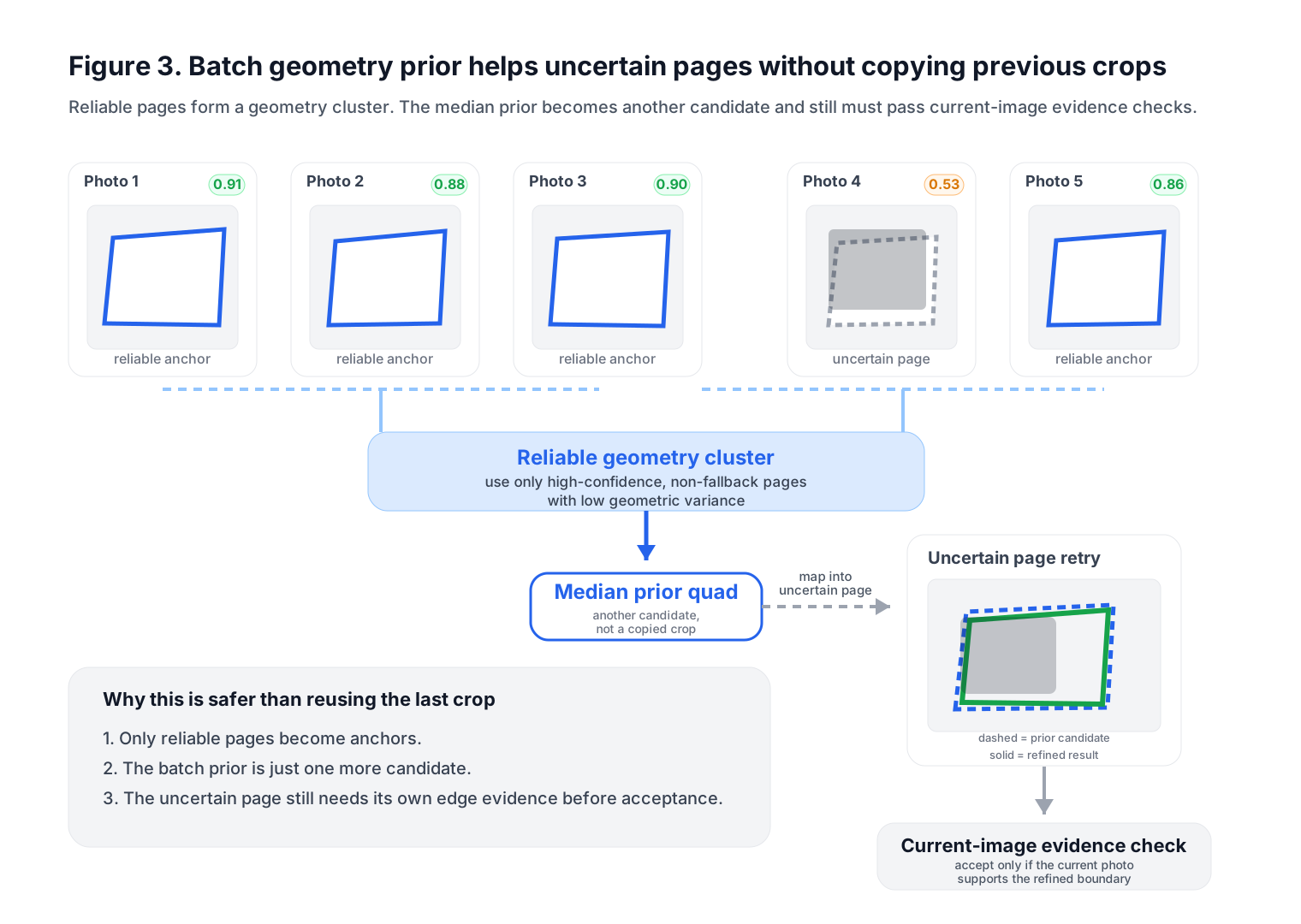
Figure 3: Reliable batch anchors form a median geometry prior, which is mapped to an uncertain page and refined against that page’s own edge evidence.
More Than a Detector Update
Detection was the largest architectural change in 2.0, but the surrounding workflow also became more robust:
- Broader source formats: presentation and document shapes now share the same perspective-correction workflow while remaining separate from PDF layout.
- Clearer review states: automatic, review-suggested, and manually adjusted results are easier to distinguish, and corner handles support keyboard adjustment.
- More resilient input handling: HEIC and HEIF conversion remains local, conversion progress is visible, and preview errors are isolated per image.
- Safer export behavior: filenames are sanitized, automatic fill handling works with paper layouts, and detection and PDF export run in separate workers with different image-size budgets.
The detector remains model-free, deterministic, and inspectable. A learned model could eventually join the system as another candidate generator, but it would still need to pass through the same validation, scoring, refinement, and review pipeline.
Measuring the Redesign
A more complicated detector is not automatically a better one. It may become slower, less predictable, or more likely to produce confident mistakes.
Slides Thief therefore includes Python and browser benchmarks based on annotated quadrilaterals. The main measurements are normalized corner error, quadrilateral intersection over union, review rate, high-confidence failure rate, and detection latency. High-confidence failure rate matters especially: a result marked for review is inconvenient, but a wrong result that appears trustworthy is much more likely to reach the final PDF unnoticed.
On the current three-image CLI regression fixture set:
| Metric | Previous baseline | Slides Thief 2.0 |
|---|---|---|
| Mean normalized corner error | 0.06833 | 0.00273 |
| Mean Quad IoU | 0.72576 | 0.98659 |
| Images with all corners under 1% | 1/3 | 3/3 |
| High-confidence failures | 1/3 | 0/3 |
| Runtime P95 | 626.23 ms | 1033.29 ms |
The browser implementation reaches a mean normalized corner error of 0.00487, a mean Quad IoU of 0.97777, and a P95 detection time of 195.05 ms on the same fixtures.
The test suite adds difficult-boundary cases: internal grids and fixed-seed image noise must preserve a high-overlap result, while a missing edge or large foreground obstruction must not become a silent success.
What Slides Thief Still Cannot Guarantee
No boundary detector can recover evidence that is not present. If most of a slide is outside the photograph, several quadrilaterals may be equally plausible. If a person covers an entire side and the scene contains multiple displays, the intended target may require human interpretation. Other difficult conditions include borderless projections, severe motion blur or overexposure, large reflections, curved projection surfaces, and large internal layout cards.
Manual four-corner adjustment therefore remains part of the normal workflow: the goal is not to eliminate human correction, but to reduce how often it is needed and surface the pages most likely to need it.
From Rectangle Detection to Evidence-Aware Review
While the original detector searched for four contrast lines forming the largest plausible rectangle, Slides Thief 2.0 evaluates which quadrilateral is best supported across visual edge gradients, convex geometry, and multi-slide batch priors—determining whether that support is sufficient to accept without review.
Individual algorithms—contrast lines, adaptive binarization, Hough transforms, and local edge refinement—solve only parts of the optical problem. Robustness comes from allowing multiple detectors to propose competing hypotheses and subjecting them to uniform geometric validation. By treating ambiguity as an actionable system state and elevating user review into an explicit workflow, Slides Thief 2.0 provides a reliable, model-free vision tool that respects privacy and runs entirely in the browser.
Try Slides Thief in the browser:
View the source code:
For the 3.0 review queue architecture, uncertainty handling, and geometry reuse, see Designing the Review Loop in Slides Thief.
-
Older Post
Designing Memory That Can Safely Forget -
Newer Post
What Should a Coding Agent Be Allowed to Remember?